
One of the most important tools in trauma performance improvement is an effective PI dashboard.
A well-designed dashboard turns large volumes of data into a clear visual overview that enables trauma program leaders to identify opportunities for improvement, plan effective changes, and monitor their impact on patient care.

However, newer PI coordinators and trauma program managers are often uncertain about how to create and configure a functional dashboard. Even many experienced trauma leaders have questions about how to maintain their dashboard and use it effectively to impact patient outcomes.
In July, we hosted a webinar that took at detailed look at this topic: The Essential Guide to Creating, Maintaining and Using a Trauma PI Dashboard.
In this article, my goal is to zero in on the basic steps to constructing a functional PI dashboard and using it to drive effective performance improvement.
Why you need a trauma PI dashboard
For the benefit of those who may be new to trauma program leadership, a performance improvement dashboard is essentially a one- to two-page visual summary of trauma registry and PI data over time.
Your PI dashboard displays your trauma program’s key clinical and operational metrics using charts and visual indicators. To clarify, this tool provides a high-level view of program performance in aggregate; it does not provide detail on individual cases.
A trauma PI dashboard enables program leaders to do two things:
First, identify issues in a timely manner. By providing a focused view of key measures, your PI dashboard quickly surfaces negative trends in clinical performance and potential quality issues. It can also spotlight instances of noncompliance with trauma center standards. This allows trauma program leaders to quickly detect both opportunities for improvement and issues that simply need further review.
Second, demonstrate the effectiveness of your PI program. ACS Standard 7.3 requires all verified trauma centers to document the effectiveness of their performance improvement and patients safety (PIPS) program. Dashboard data is strong evidence that your team is systematically using audit filters to identify PI events, studying and evaluating the results of corrective actions, and monitoring ongoing performance to ensure loop closure and sustained improvement. In particular, dashboard data is essential to fulfilling any “track and trend” action item connected to a PI case review.
The 4 essential elements of a trauma PI dashboard
What goes into a trauma PI dashboard? Different leadership teams will take different approaches depending on the scale of their trauma program and their particular challenges. However, four basic elements are essential:
1. Key performance metrics. Your dashboard should include some basic program metrics, such as total patient volumes and breakdowns by mechanism of injury. It should also include a range of basic performance metrics, including mortality rates, unplanned ICU admissions, unplanned returns to OR, time to CT, time to blood administration, activation response times and over/under-triage rates. Your dashboard should also track performance on any specific issues that your program is working on. For instance, if your team has recently implemented a clinical practice guideline on antibiotic prophylaxis for abdominal injuries, track guideline compliance in your dashboard. Your dashboard should also include all required performance metrics, such as specialty response times and SBIRT compliance. I also recommend including TQIP hospital events in your dashboard. Even though these metrics are not risk-adjusted, they can serve as a leading indicator of quality issues.
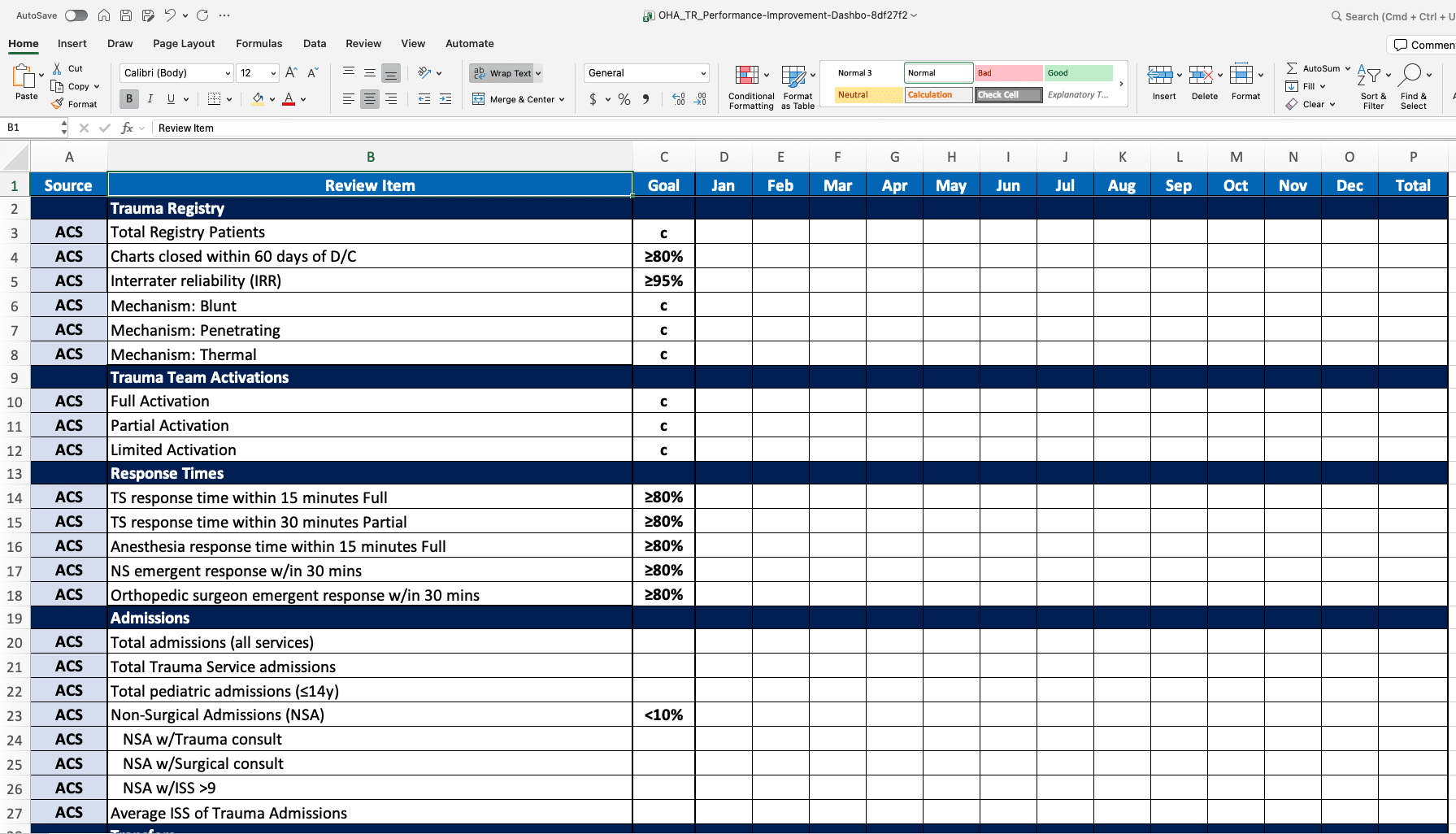
2. Benchmarking data. Performance metrics become meaningful when compared to performance goals. Your PI dashboard should include benchmark thresholds from TQIP or state/regional benchmark efforts. It should also include your program’s internal performance goals along with historical performance data. (Tip: Never set a benchmark goal of 100%, which is unachievable. Instead, target 95% compliance for most goals, which represents attainable high performance.)
3. Visual performance indicators. The most useful dashboards include visual cues that allow users to see at a glance whether performance on any given measure is on track or in a danger zone. There are several ways to do this, but my personal favorite is a simple “traffic light” system where green indicates meeting goal and red indicates not meeting goal. You can automate this color system using conditional formatting, or you can manually format cell color whenever you update dashboard data.
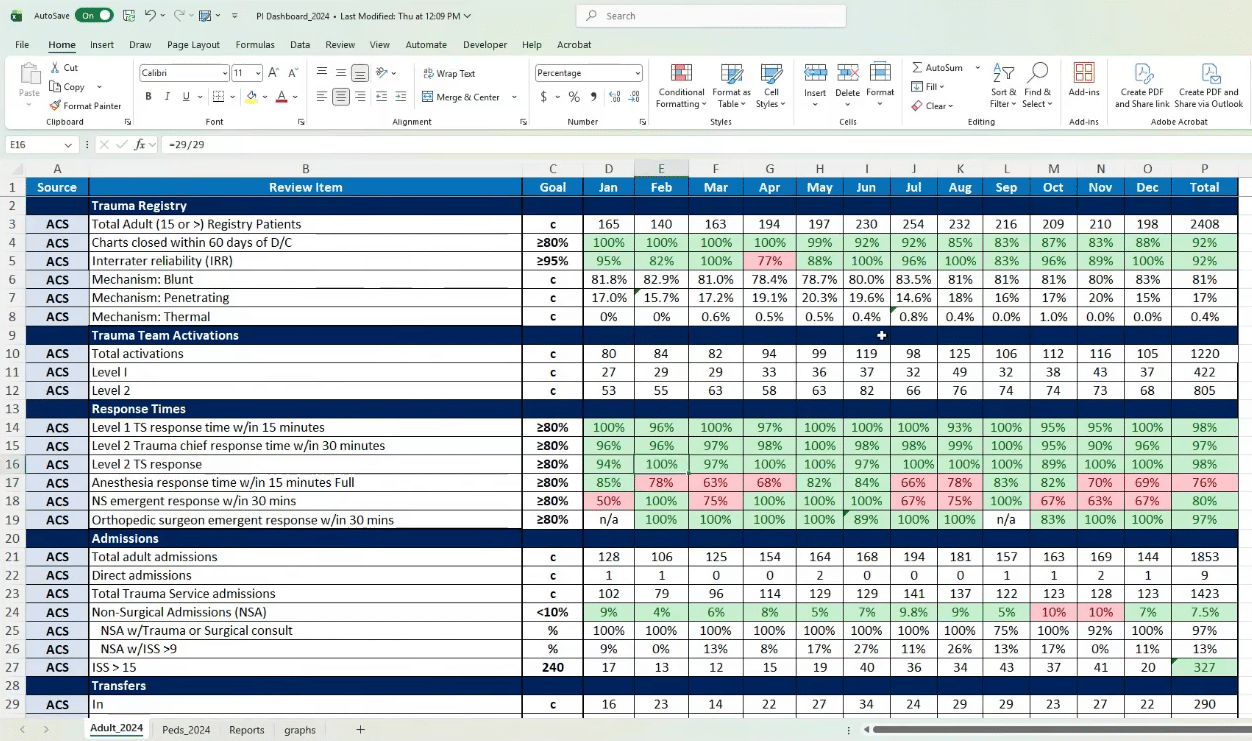
4. Volume context. A percentage means nothing without the numerator and the denominator behind it. For every metric tracked, your dashboard should also provide volume context in the form of total activations, total admissions, total deaths, etc. Tip: Keep the numerator/denominator formula of each metric visible within the dashboard (e.g., in the Excel formula bar) so its underlying math can be reviewed on the spot during PI meetings.
Practical guidance on building a PI dashboard
Before you get started building your PI dashboard, know that it is a labor-intensive project. However, the time you invest intro creating this tool will pay off in a dramatically more efficient and effective PI process.
What software should you use to build your PI dashboard?
The good news is that Microsoft Excel is a perfectly good choice. Most hospitals already own it, and most nursing leaders are already familiar with the basics. In addition, Excel education is readily available, either through free courses provided by your hospital or the many great tutorial videos available on YouTube.
Having said that, there are a number of equally good alternatives, from systems like Tableau and Power BI to Google Sheets.
What is the best way to get started?
I recommend starting slow. Do not begin by trying to configure a comprehensive 150-metric dashboard. Instead, create one metric with one conditional format and expand from there.
For example, begin with trauma surgeon response to full activation within 15 minutes, complete with your performance target, the related numerator and denominator, and conditional formatting to indicate compliance or non-compliance.
What data sources should we use?
First, always source dashboard data from the trauma registry, not the EHR. The registry is the “source of truth” for your trauma program, so your PI dashboard should be completely in line with your registry data.
Second, as noted above, clearly define and document the numerator and denominator of each data point you pull.
Third, never exclude any case from a data pull unless it genuinely does not qualify for dashboard inclusion as defined by that metric’s denominator. If there is a legitimate reason to exclude a case from the dashboard, document the reason.
How should the dashboard be organized?
I recommend organizing your dashboard by phase of care. In other words, group metrics by pre-hospital, ED, radiology, OR, ICU, medical-surgical, orthopedic trauma, neuro trauma, etc.
In addition, add a “source” column that indicates why each metric is tracked (ACS standards, state standard, TQIP, PI, etc.).
After the metric descriptor, show the performance goal and then actual performance for each month. Finally, include a “total” column to indicate the annual average (for percentage metrics) or sum (for simple counts).
As a practical tip, I recommend freezing the header row of your dashboard so the column labels remain visible while users scroll.
Practical guidance on maintaining a PI dashboard
Here are a few recommendations for making the dashboard maintenance process manageable:
Clear ownership: Assign dashboard ownership to two people. That way, if one person is out the other will be able to keep the dashboard on track. Do not allow multiple people to make changes to the dashboard. It should be accessible by the entire trauma leadership team, but only the designated owners should be able to touch the underlying data.
Manual pulls: Do not try to auto-pull dashboard data continuously from other systems. Instead, set aside dedicated time each month to pull registry reports and update the dashboard. Why am I recommending this? EHR-based reports often include patients who are not part of the designated trauma population, resulting in inaccurate denominators, misleading performance metrics, and discrepancies during trauma center verification and designation reviews. In contrast, the trauma registry contains the validated population of patients who meet trauma registry inclusion criteria and it aligns with ACS and state trauma program reporting standards. Utilizing registry data to populate your dashboard ensures consistency, accuracy, meaningful benchmarking, and reliable identification of performance improvement opportunities.
Coordinate with registry: While the trauma registry is a major source of dashboard data, do not wait for 100% registry completion to run dashboard reports. I recommend running reports when registry data is roughly 90% complete, then update your dashboard reports later after the registry data is finalized.
Data validation: The usefulness of any dashboard is limited by the quality of the underlying data. For this reason, your program’s data quality plan should include a data validation plan. Data validation is a huge topic in itself, but in summary it needs to be a structured, ongoing effort that addresses data quality at multiple levels.
Using your dashboard to drive PI activities
As noted above, a trauma PI dashboard enables a trauma leadership team to identify issues early and initiate corrective actions promptly.
For example, say your program has established the goal of keeping non-surgical admissions under 10% and your monthly NSA rates typically range between 4% and 8%. But then in one month the NSA rate hits 12%. This may be an error in the underlying data — or maybe something in your care processes has changed (e.g., new staff who do not understand your protocols). Either way, the dashboard acts like an early warning system that allows the PI team to investigate the issue promptly, identify the cause of the fall-out and take steps to resolve it.
It is important to understand that while a performance dashboard is an effective tool for identifying opportunities for improvement (OFIs), the dashboard itself does not show you how to correct issues in quality or patient care.
That is why I always recommend pairing your performance improvement dashboard with the Plan-Do-Study-Act (PDSA) performance improvement framework.
PDSA is structured approach to devising and implementing corrective actions, assessing their results, and adjusting interventions as needed to obtain durable improvements in quality and outcomes.
(To learn more about this performance improvement methodology, read How to use PDSA in trauma performance improvement or watch our recent 30-minute “PDSA Workshop for Trauma PI Professionals”.)
A dashboard is also a great tool for leading robust PI discussions.
During system meetings, pull up dashboard data on the relevant system issues being discussed and reviewed. For example, if your team is working on SBIRT compliance, display your dashboard results for individual screening, brief intervention and referral for treatment rates.
And during peer review meetings, use the dashboard to add depth to case review discussions. For instance, when reviewing an isolated hip fracture case, pull up dashboard data on IHF to OR within 48 hours for the last month, quarter and year.
When using a dashboard to drive PI, keep two things in mind:
First, it is important to maintain the distinction between registry-driven dashboard data and PI determinations. The PI process is used to review cases that may have an OFI. The registry is used to capture data on any case that meets inclusion criteria.
To illustrate this point, consider a case that includes an acute kidney injury (AKI). PI may determine that the AKI had an impact on the patient’s care, length of stay, and outcome. At the same time, the registry team may determine that the case did not meet the NTDS definition for inclusion in the registry. Since the event had an OFI, it should be included in the PI dashboard. However, since the event does not meet the relevant NTDS definition — regardless of what the PI determination was — it should not be added to the trauma registry.
Second, dashboard data — and therefore the PI process — can be vulnerable to inconsistent documentation. For example, inconsistent documentation of response times can produce significant anomalies in the PI dashboard. If possible, add a note template to the EHR for physician documentation of response times. If that is not feasible, make sure to define a clear data source hierarchy within your data dictionary to make sure response times are captured as consistently as possible.
How to leverage AI to strengthen your trauma dashboard
Artificial intelligence is a great resource for creating and using a trauma PI dashboard, but use AI as a support tool but not as a PI decision-maker.
It is perfectly acceptable to use AI to suggest conditional-formatting rules, draft spreadsheet formulas in plain language and troubleshoot errors. However, accountability for patient safety, data integrity and overall PI quality stays with program leaders.
Here are some specific guidelines:
Always validate AI findings or suggestions against source data. To see why, consider this scenario: AI-generated surveillance identifies a potential decrease in trauma surgeon response compliance. The PI team performs case-level validation against trauma registry records, activation logs and EHR documentation. This review identifies three documentation errors, two registry abstraction errors and one incorrectly included activation. Following the data validation, surgeon response compliance is recalculated from 72% to 82%, meeting the program benchmark. The validation process showed that the AI finding was incorrect. Instead, it identified OFIs in provider documentation and registry quality review.
Watch for AI “hallucinations” that appear credible but are not supported by the underlying data. For example, an AI Output reads “Analysis identified five trauma patients who met Massive Transfusion Protocol criteria but did not receive MTP activation. This represents a significant compliance concern.” This statement sounds reasonable, but validation is required:
- Step 1: Review the source data. The trauma program manager reviews trauma registry records, blood bank records, MTP activation logs and patient charts.
- Step 2: Compare AI findings to actual documentation. The review reveals that two of the patients received blood products but never met MTP criteria; one patient was a medical GI bleed patient mistakenly included in the trauma dataset; and one patient had a documented MTP activation that the AI failed to recognize because the terminology differed from the programmed search criteria. Only one patient truly met criteria and did not receive MTP activation.
- Step 3: Correct the finding. The validated finding is 1 potential missed MTP activation requiring PI review.
Maintain compliance with HIPAA and your organization’s privacy policies. Specifically, never enter patient identifiers or other protected health information (PHI) into unauthorized AI tools. Assume that any AI tool may retain or transmit entered information.
Finally, review all AI-generated reports before they are used or shared. Again, AI technology can generate amazing outputs but it is not perfect. Trauma program leaders have ultimate responsibility for the accuracy and completeness of trauma dashboard data.
Dashboard template available
A trauma performance improvement template in Excel format is available at the Optimal Healthcare Advisors website. To download the template, visit our Resources page.
And if you have any additional questions about trauma performance improvement dashboards, please feel free to get in touch with us any time via our Contact page.